Data queries v2, full RSC support, and Studio workflow improvements
Major upgrades for data queries, and lots of new UI enhancements in the studio!

Data queries revamp and full RSC support
Data-driven pages are critical to helping your website scale with content. But they were also complicated and required close collaboration between editors and developers.
While our existing data queries got the job done, there were a few nuances with how it interacted with modern web frameworks that required us to revamp it completely. Our new data queries will feel mostly the same in the Studio editor, but offer much more flexibility for developers. For the deeper technical write-up, including rationale behind the change, security implications, and migration details, read the full post here: Data queries, evolved.
The two big changes about the new data queries you need to know are:
New data queries are no longer proxied through Plasmic servers.
You can write your own data queries (either in Plasmic Studio or in your app host code) if our built-in integrations aren’t enough!
Here’s a quick demo of how this works in the studio:
For teams using an app host, new data queries are generated in React Server Components, so your app can statically generate your pages, with full support for dynamic bindings to UI elements and SEO metadata tags.
Learn how to create custom data integrations in code and connect with Plasmic:
This workflow should feel closer to how production-ready apps and websites are traditionally built - with developers writing and maintaining the data functions in code, and editors visually binding them to UI elements.
Faster access to data tokens
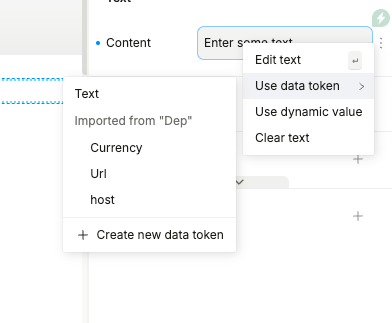
We continue to expand our new features, and wanted to make the everyday work of wiring data to your UI much faster. Now you can reach the values you need right where you are already editing!
Common data tokens are now available directly from the context menu after the right-click:
Component props can now be grouped
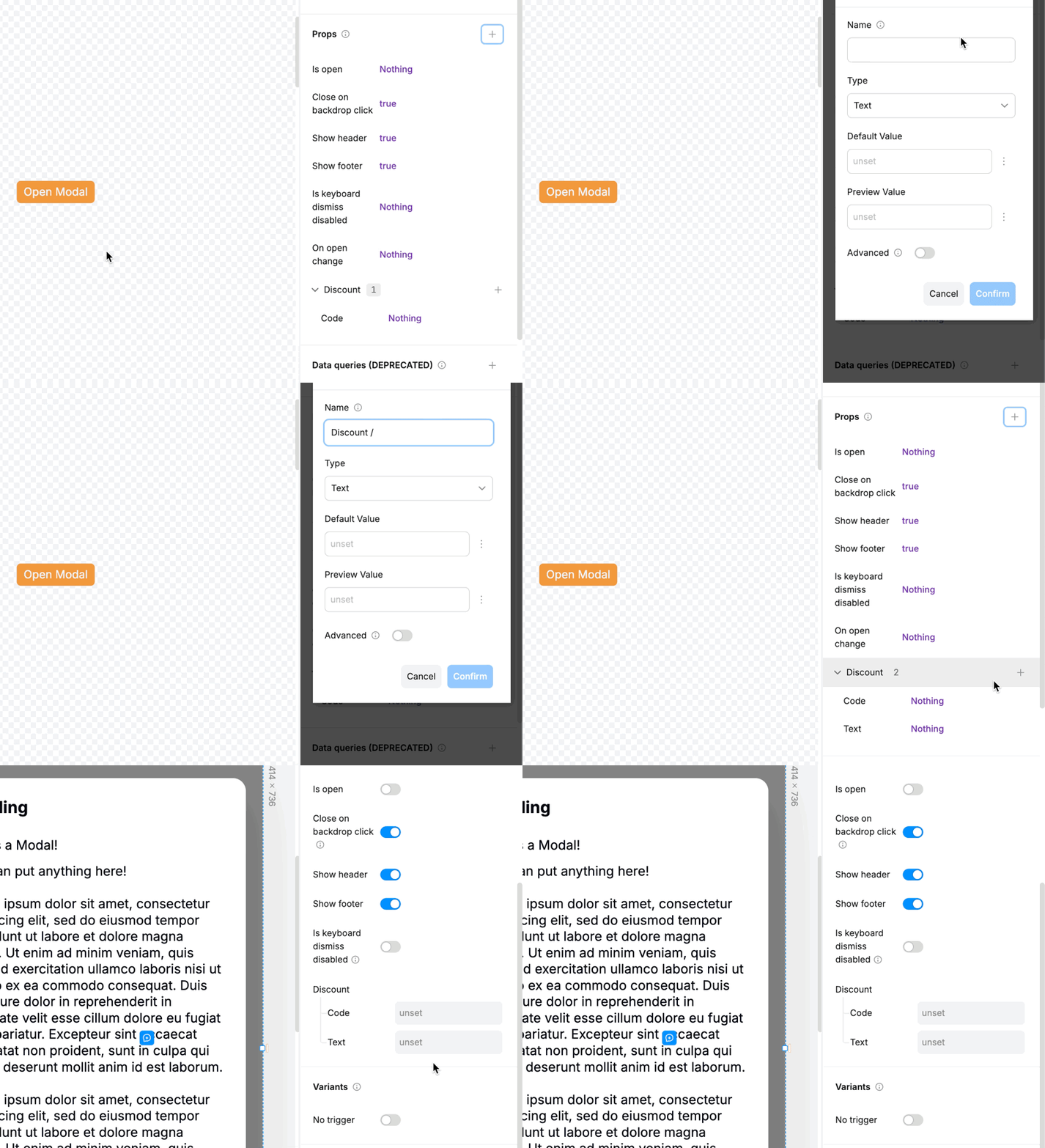
Reusable components become harder to use as they get more capable, especially when a single component offers many variations and content options.
Component props can now be organized into groups - just add the / separator to create the group, in the same way as you do with tokens, pages, components, and other entities in Plasmic.
CMS entry sorting
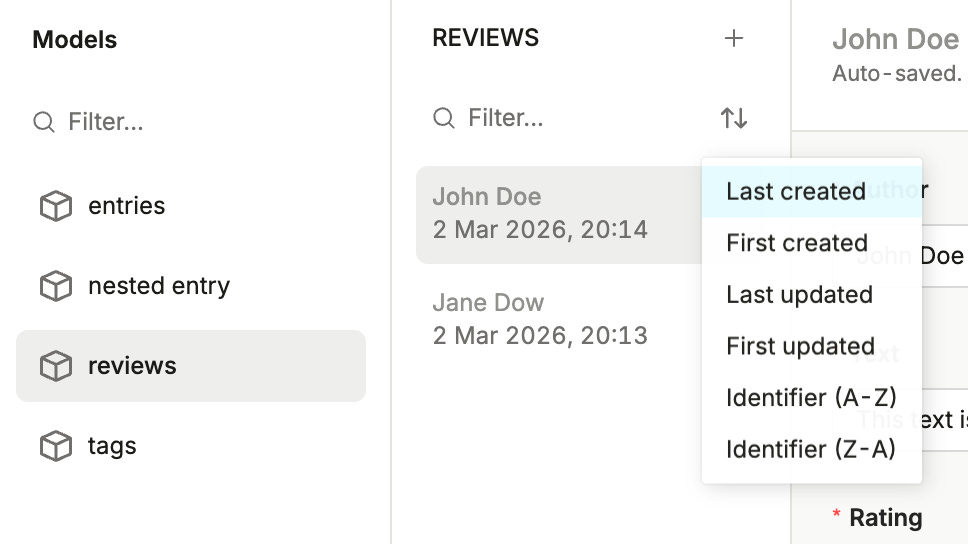
CMS tables are easier to work with now - your entries can be sorted directly from the table view, including by publish date, created date, updated date, and identifier.
Better search params support for App Router
Plasmic now handles search params more smoothly in Next.js App Router projects, so you can use those values in dynamic expressions and interactions with less custom wiring, and you can pass them into data queries when the page needs to fetch different results based on the current URL.
We added a new field to the PlasmicRootProvider called trackQueryParams.
It is enabled by default on all new CLI projects. If true, query params derived from location.search sync with client-side history changes. pageQuery prop is used as a fallback during SSR.
// pages/[[...catchall]].tsx
...
  const pageMeta = plasmicData.entryCompMetas[0];
  return (
    <PlasmicRootProvider
      loader={PLASMIC}
      prefetchedData={plasmicData}
      prefetchedQueryData={queryCache}
      pageRoute={pageMeta.path}
      pageParams={pageMeta.params}
      pageQuery={router.query}
      trackQueryParams
    >
      <PlasmicComponent component={pageMeta.displayName} />
    </PlasmicRootProvider>
  );
...
This ties neatly into the larger data query work, because many real pages start with the URL, use that URL to decide what to fetch, and then render a design that should still be easy to update visually later.
What’s next
Try the latest changes when you have a chance, and tell us what you think!
Also, keep an eye on the updates. We are preparing another major release soon.
Quick hint: it will be AI-related 👀
🤝 Join our community
Stay in the loop and connect with fellow creators. Join our forum at forum.plasmic.app and Slack at plasmic.app/slack.